The Problem: AI That Works for You, Not the Other Way Around
I spend most of my day across multiple contexts: research at USC ISI, side projects, email, code reviews, and keeping up with a field that moves faster than anyone can track manually. The standard workflow for using AI is to open a browser tab, paste your context, ask a question, copy the answer, and go back to what you were doing. It works, but it is friction-heavy and interrupts whatever you are actually trying to do.
What I wanted was different: an AI assistant that runs 24/7 on hardware I own, monitors my email and calendar without being asked, backs up its own workspace to GitHub every night, and is reachable from Discord on my phone. Not a chatbot I visit. An agent that lives on my desk and does work while I sleep.
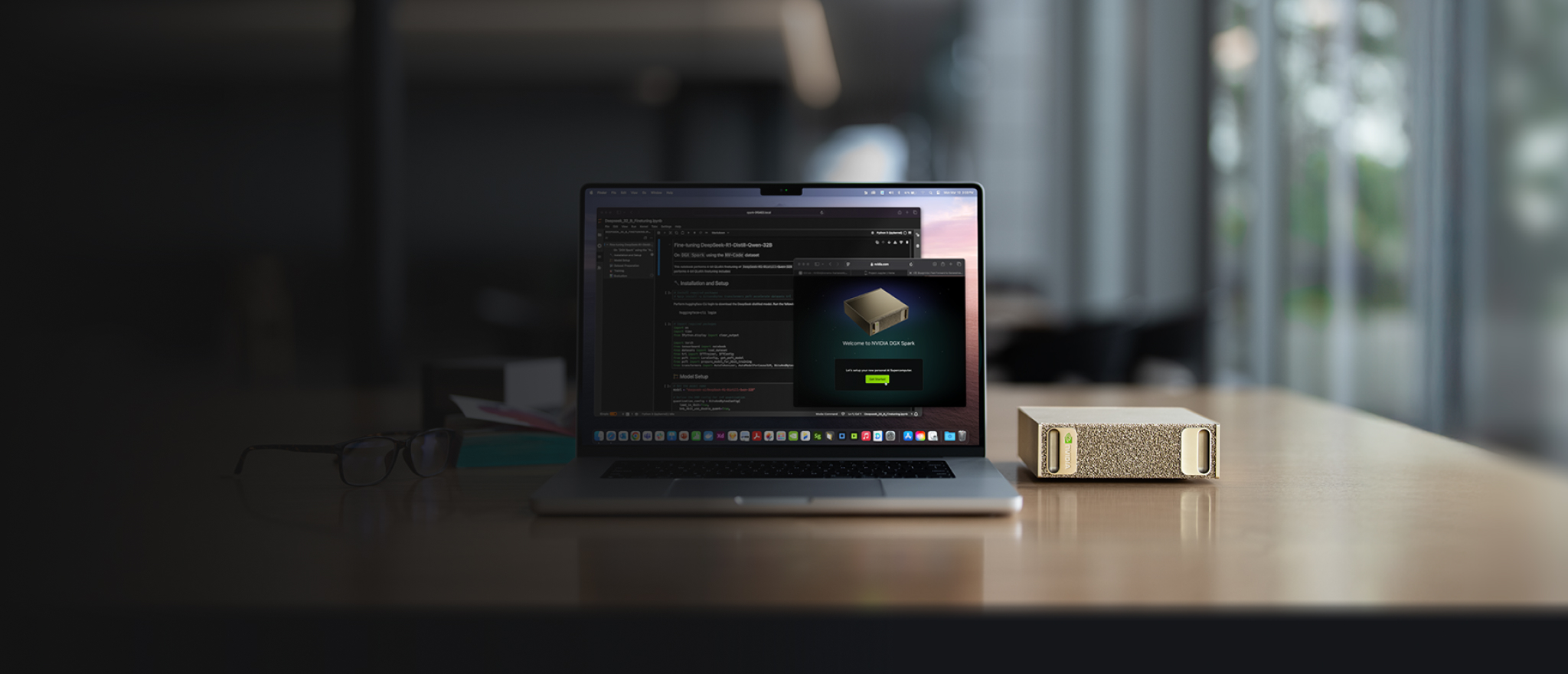
This post is about how I built that. The hardware is an NVIDIA DGX Spark, the software is OpenClaw and Ollama, and the result is a system that handles a surprising amount of my daily workflow autonomously.
The Hardware: DGX Spark
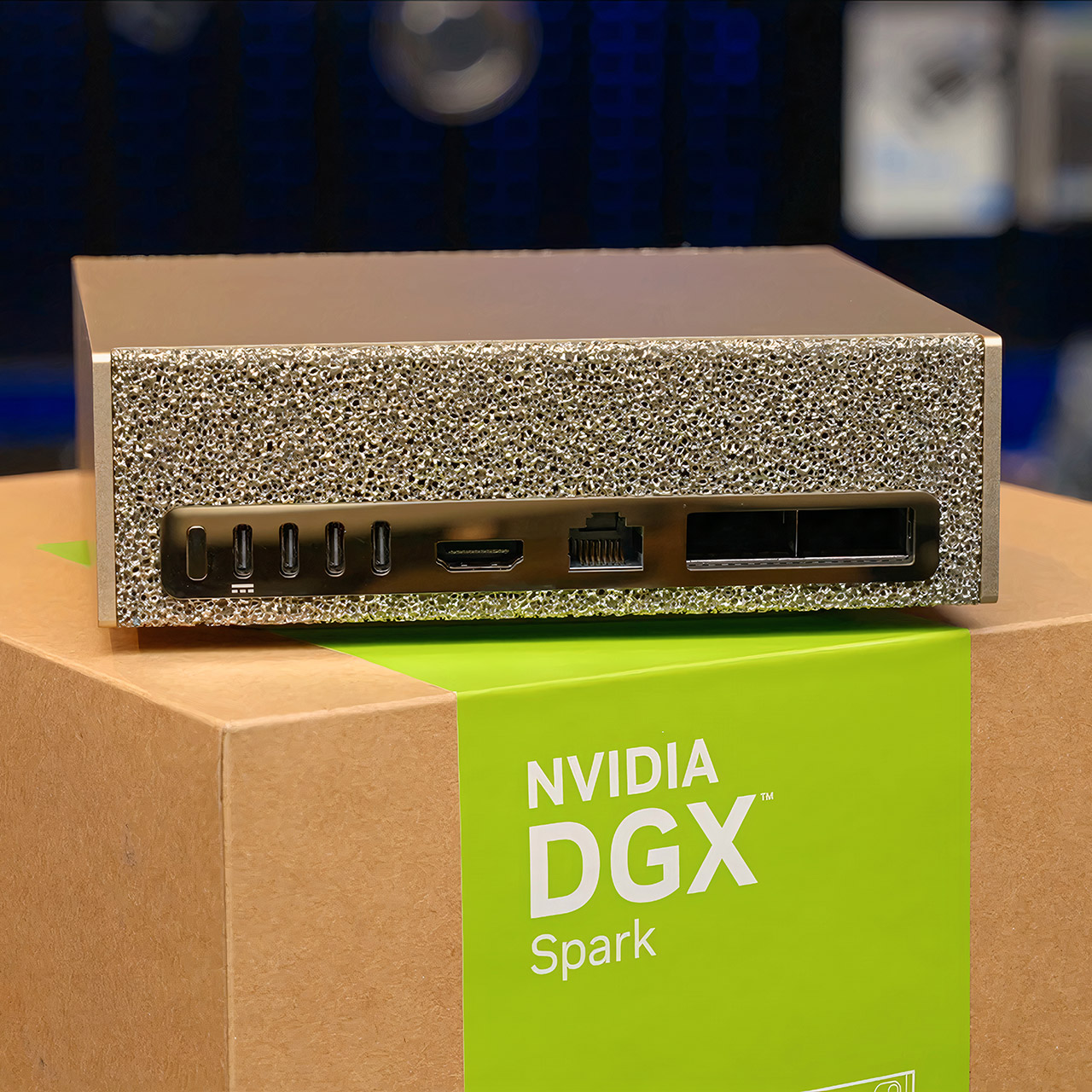
The DGX Spark is NVIDIA's desktop AI workstation built around the GB10 Grace Blackwell Superchip. The key spec for what I am doing is the 128GB of unified LPDDR5X memory. Unified memory means the CPU and GPU share the same memory pool, which is critical for running large language models locally. The model weights need to fit in memory, and unified memory lets you load models that would not fit in a discrete GPU's VRAM alone.
My setup:
Hardware: NVIDIA DGX Spark (GB10 Grace Blackwell Superchip), 128GB unified LPDDR5X, aarch64
OS: Ubuntu 24.04
CUDA: 13.0
Always-on: Yes. Runs 24/7 as a headless server on my desk
The machine draws reasonable power for what it delivers. It is quiet enough to sit in a home office and powerful enough to run 120B-parameter models at interactive speeds. For context, running gpt-oss:120b locally takes about 65GB of the 128GB, leaving plenty of room for a second smaller model, Docker containers, and the rest of the stack.
The Software Stack
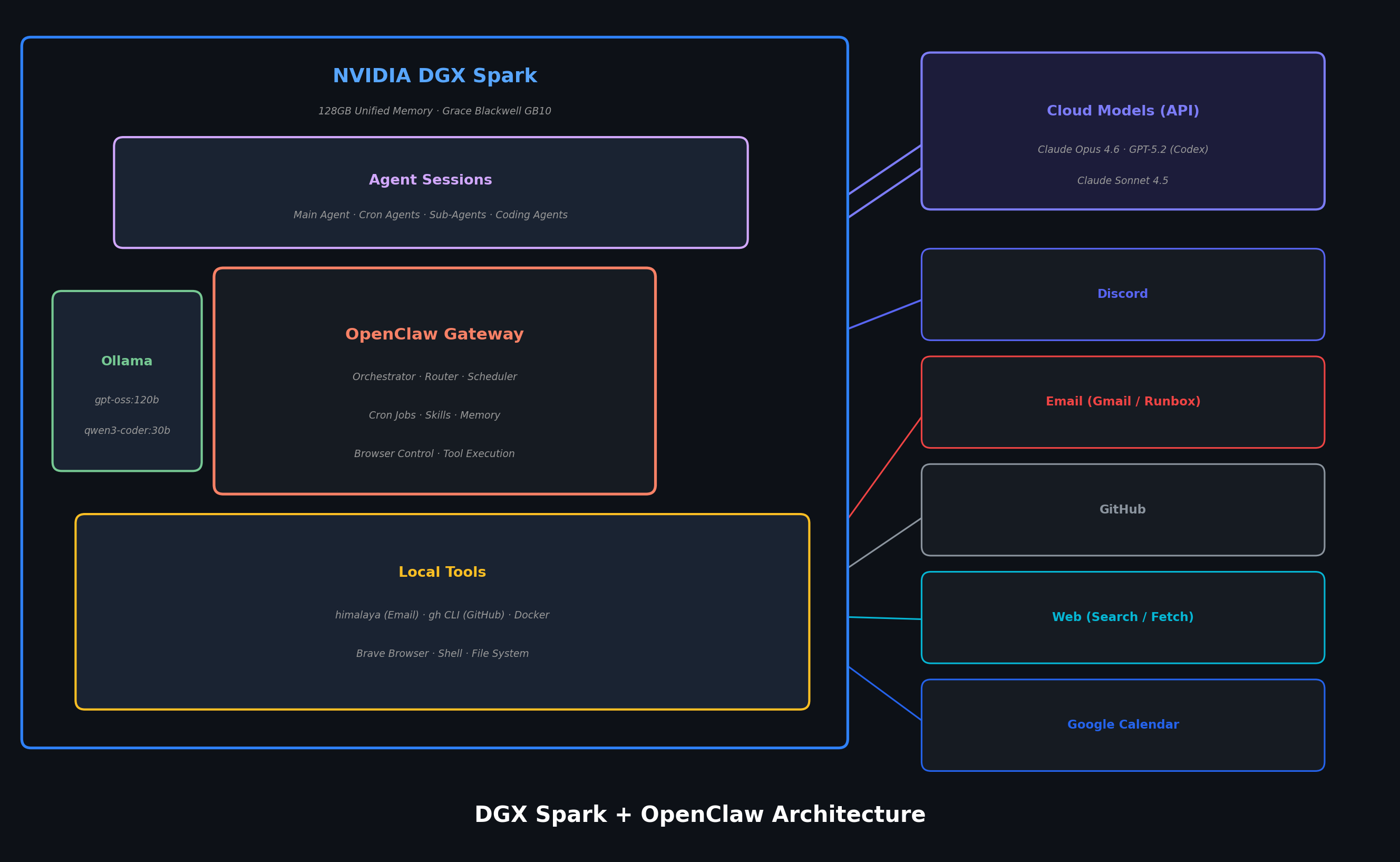
Three main pieces make this work:
Ollama serves local models. It handles model management, quantization, and exposes an OpenAI-compatible API on localhost. I run two models concurrently:
- gpt-oss:120b - OpenAI's open-weight MoE model. 120B total parameters, ~5B active per token. Uses about 65GB in MXFP4 quantization. This is the workhorse for reasoning, research, and complex tasks.
- qwen3-coder:30b - Alibaba's coding-focused model. ~19GB. Fast and sharp for code generation, reviews, and scripting tasks.
OpenClaw is the orchestration layer. It is a self-hosted gateway that connects AI agents to messaging platforms (Discord, Telegram, WhatsApp, Signal, iMessage), manages sessions, runs cron jobs, handles memory, and provides tools like browser automation, email access, and shell execution. Think of it as the operating system for your AI assistant.
Cloud model APIs as fallback. For tasks that need frontier-level reasoning (long research sessions, complex multi-step planning), I have Claude Opus 4.6, Claude Sonnet 4.5, and GPT-5.2 available via OAuth. OpenClaw handles model routing and failover automatically. If a cloud API is rate-limited, it falls back to local models.
Why OpenClaw + Ollama (and Not Just Claude Code or ChatGPT)
I use Claude Code and ChatGPT regularly for interactive coding and conversations. They are excellent tools. But they are not always-on infrastructure. They do not:
- Run cron jobs that check your email at 7 AM and send you a briefing on Discord
- Monitor your sent emails and draft follow-ups for threads that went cold
- Automatically research trending AI topics every Monday and open a blog post PR
- Back up their own workspace to GitHub every night
- Let you message them from your phone at 2 AM and get a response in seconds
OpenClaw fills that gap. It is the always-running process that turns an LLM from a tool you use into an agent that works for you. And because Ollama runs locally, most of these automations cost nothing in API fees.
The Automations: What Runs and When
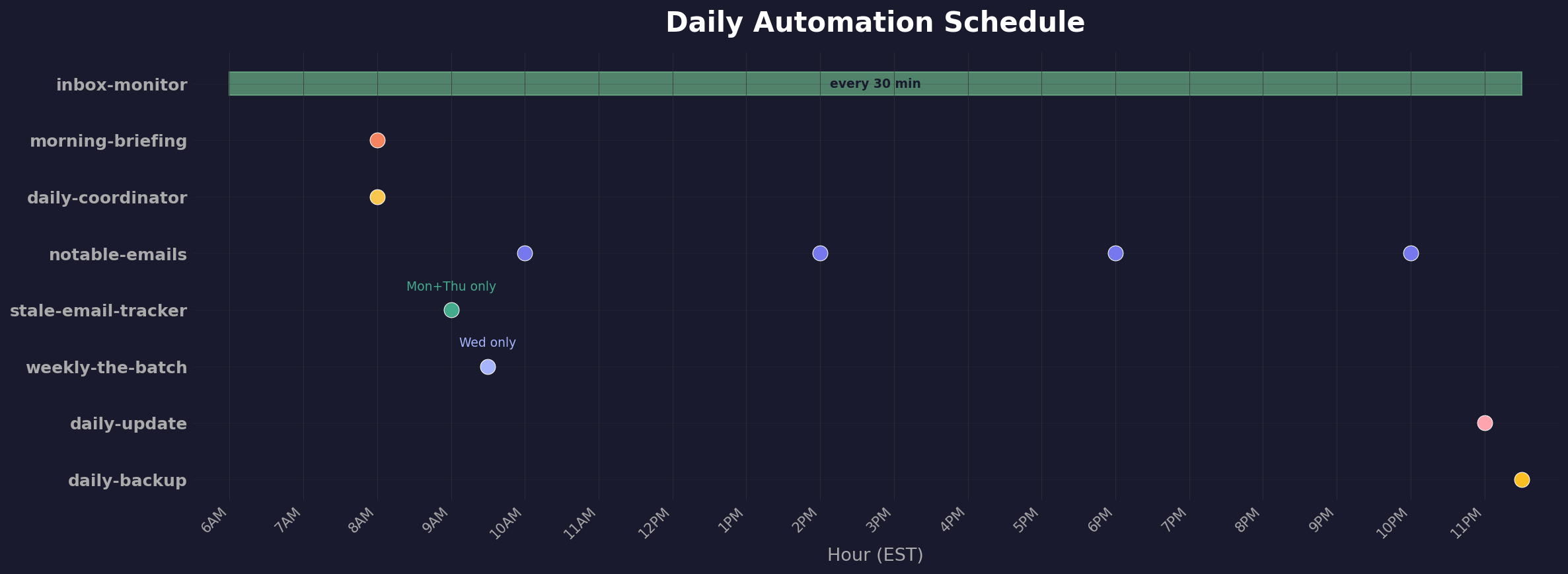
OpenClaw has a built-in cron system that runs agent prompts on a schedule. Each cron job gets its own isolated session, so they do not interfere with each other or with my main conversation. Here is what runs on my machine daily:
Morning Briefing (8 AM EST)
Every morning at 8 AM, two cron jobs fire simultaneously. The morning-briefing generates a daily digest and posts it to Discord. It checks weather, summarizes top AI news, and flags anything on the calendar. The daily-coordinator reviews ongoing tasks and posts a prioritized task list to a separate Discord channel.
The prompt for the morning briefing looks like this:
Generate a daily digest and post it to Discord #briefing. Discord has a 2000-character message limit. Each message MUST be under 2000 characters. Check: weather for Washington DC, top AI/ML news headlines, calendar events for today and tomorrow, any pending tasks from SESSION-STATE.md.
I wake up, check Discord on my phone, and have a briefing waiting. No manual prompting required.
Inbox Monitor (Every 30 Minutes, 7 AM to 11 PM)
This is the most frequently running automation. Every 30 minutes during waking hours, an agent scans my Gmail and Runbox inboxes using himalaya (a CLI email client). It looks for anything urgent or time-sensitive and sends a Discord notification if it finds something.
The prompt:
You are a monitoring agent. Scan emails and calendar for anything needing Darrell's attention. Use himalaya CLI via exec to check Gmail and Runbox accounts. Look for: urgent emails, meeting invites, time-sensitive requests. If nothing needs attention, reply HEARTBEAT_OK (costs nothing). If something is urgent, send a Discord message with the details.
Most runs return HEARTBEAT_OK and cost nothing. When the LLM responds with that exact string, the OpenClaw gateway recognizes it as a "nothing to report" signal and discards the message silently. It never gets posted to Discord or any other channel. You only get notified when something actually needs your attention. This is what makes high-frequency cron jobs practical: a job that runs every 30 minutes but only messages you a few times a day.
Notable Email Triage (4x Daily)
At 10 AM, 2 PM, 6 PM, and 10 PM, a separate agent does a deeper email analysis. Instead of just flagging urgent items, it reads the last 4 hours of emails across both accounts and surfaces anything "notable". Things that are not urgent but worth knowing about. Conference CFPs, interesting newsletters, responses to threads I am tracking.
The prompt:
You are an email triage agent. Read emails from the last 4 hours across Gmail and Runbox using himalaya CLI. For each email, classify it as: (1) requires action, (2) FYI/informational, or (3) ignorable. Surface anything "notable" - emails from known contacts, threads with multiple replies, anything mentioning deadlines or money. Format as a short bullet list grouped by category. If nothing notable, reply HEARTBEAT_OK. Keep output under 2000 characters for Discord.
Stale Email Tracker (Monday + Thursday, 9 AM)
Twice a week, an agent reviews my sent emails and checks whether any important threads went unanswered. If I emailed someone a week ago and never heard back, it drafts a follow-up for me to review. This catches the threads that would otherwise fall through the cracks.
The prompt:
You are a follow-up tracking agent. Check sent emails from the past 7 days using himalaya CLI. For each sent email, search for replies in the inbox. Flag any thread where: (1) I sent an email 3+ days ago with no reply, (2) the recipient is a known contact or colleague, (3) the original email asked a question or requested something. For each flagged thread, draft a brief follow-up message I can review. Post results to Discord. If no stale threads found, reply HEARTBEAT_OK.
Daily Update + Backup (11 PM / 11:30 PM)
At the end of each day, two maintenance jobs run. The daily-update checks for OpenClaw updates, applies them, and restarts the gateway if needed. The daily-backup commits the workspace to a private GitHub repo with automatic secret redaction. Any API keys or tokens in the workspace are stripped before the commit.
The update prompt:
Check for OpenClaw updates: run openclaw update --check. If an update is available, apply it with openclaw update, then restart the gateway with openclaw gateway restart. Report what version you updated to. If already up to date, reply HEARTBEAT_OK.
The backup prompt:
Back up the workspace to GitHub. Steps: (1) cd to workspace directory, (2) git add -A, (3) check git diff --staged for any secrets (API keys, tokens, passwords) - if found, unstage those files and report them, (4) git commit with a message summarizing changes, (5) git push. Report success or failure to Discord.
The Prompt Patterns That Work
After running this setup for weeks, some prompt patterns have proven more effective than others for cron-based automation. Here are the ones I use most:
The silent-by-default pattern: Always give your agent an explicit escape hatch for "nothing to report." Without this, agents will generate filler content on every run just to have something to say.
If nothing needs attention, reply HEARTBEAT_OK. Do NOT generate a summary saying "all clear" or "no updates" - just reply with the exact string HEARTBEAT_OK.
The output-constraint pattern: Discord has a 2000-character message limit. If your agent does not know this, it will generate 4000-character messages that get truncated. State the constraint explicitly in every prompt that outputs to a messaging platform.
Discord has a 2000-character message limit. Each message MUST be under 2000 characters. If your response is longer, split it into multiple messages. Send the first part, then send the rest as follow-up messages.
The tool-specification pattern: Do not assume the agent knows which tools are available. Spell them out.
TOOLS AVAILABLE: Email via himalaya CLI (exec tool). Git/GitHub via gh CLI (exec tool). Discord messaging via the message tool (action: send, target: channel ID). Web search via web_search tool. Do NOT use curl for messaging - use the message tool directly.
The isolated-context pattern: Cron jobs run in isolated sessions with no chat history. Everything the agent needs must be in the prompt. Do not reference previous conversations or assume the agent remembers anything.
You are running as an isolated cron job. You have no chat history. All context you need is in this prompt. Do not reference previous runs. Read SESSION-STATE.md if you need workspace context.
Prompt Templates for Your Own Setup
If you want to build something similar, here are starter prompts you can adapt. These are simplified versions of what I actually run:
Email Monitor:
You are an email monitoring agent. Check for new emails using: himalaya envelope list -a [account-name]. Look at the last 10 emails. If any are urgent (meeting in <2 hours, direct requests from known contacts, security alerts), send a notification to Discord channel [ID] using the message tool. If nothing is urgent, reply HEARTBEAT_OK. Do not summarize non-urgent emails.
Morning Briefing:
Generate a morning briefing and post to Discord channel [ID]. Include: (1) weather for [your city], (2) top 3 AI/ML headlines from the past 24h using web_search, (3) calendar events for today. Keep each Discord message under 2000 characters. Be concise - bullet points, not paragraphs.
Workspace Backup:
Back up the workspace to GitHub. Steps: (1) cd to workspace directory, (2) git add -A, (3) check git diff --staged for any secrets (API keys, tokens, passwords) and remove them before committing, (4) git commit with today's date, (5) git push. Report success or failure to Discord channel [ID].
Setting This Up Yourself
You do not need a DGX Spark to run this. Any machine with enough memory for the models you want to run will work. Here is the minimum path:
Step 1: Install Ollama. One command on macOS or Linux:
curl -fsSL https://ollama.com/install.sh | sh
Step 2: Pull a model. Start with something that fits your hardware:
ollama pull qwen3-coder:30b    # ~19GB, needs 24GB+ RAM
ollama pull gpt-oss:120b       # ~65GB, needs 80GB+ RAM
Step 3: Install OpenClaw.
curl -fsSL https://openclaw.ai/install.sh | bash
openclaw onboard --install-daemon
The onboarding wizard walks you through everything: authentication, model configuration, and connecting your first messaging channel. The getting started guide covers the full process.
Step 4: Connect a channel. Discord is the easiest starting point. Create a bot on the Discord Developer Portal, add its token to OpenClaw, and invite it to your server. The wizard handles the configuration.
Step 5: Add cron jobs. Instead of setting up cron jobs manually, just ask your OpenClaw agent to do it. In Discord (or whatever channel you connected), tell it what you want:
Set up a cron job that checks my email every 30 minutes during waking hours (7 AM to 11 PM EST) and notifies me on Discord if anything urgent comes in. If nothing needs attention, stay silent.
Multi-Agent Swarms: Divide and Conquer
One of the most powerful features of this setup is the ability to spawn multiple agents that work in parallel. OpenClaw does not run a single monolithic agent. Instead, it orchestrates a swarm of specialized agents, each with its own session, model, and tools.
Here is how it works in practice. The main agent is always running, and that is the one I talk to directly through Discord. It has full context: my memory files, workspace state, conversation history. When it encounters a task that is complex or time-consuming, it can spawn sub-agents to handle the work.
For example, if I say "research the latest federated learning papers and summarize them," the main agent does not sit there blocking while it reads 10 papers. Instead, it spawns a sub-agent with a focused prompt, assigns it the research task, and continues handling my other messages. The sub-agent runs in its own isolated session, does the work, and reports back when finished. The main agent can check on it or receive the results asynchronously.
Cron jobs are another form of this. Each cron job (inbox-monitor, morning-briefing, notable-emails) is its own independent agent session. At 8 AM, the morning-briefing agent spins up, does its job, posts to Discord, and terminates. It has no knowledge of what the inbox-monitor agent did 30 minutes earlier. They are fully isolated.
The architecture supports several agent patterns:
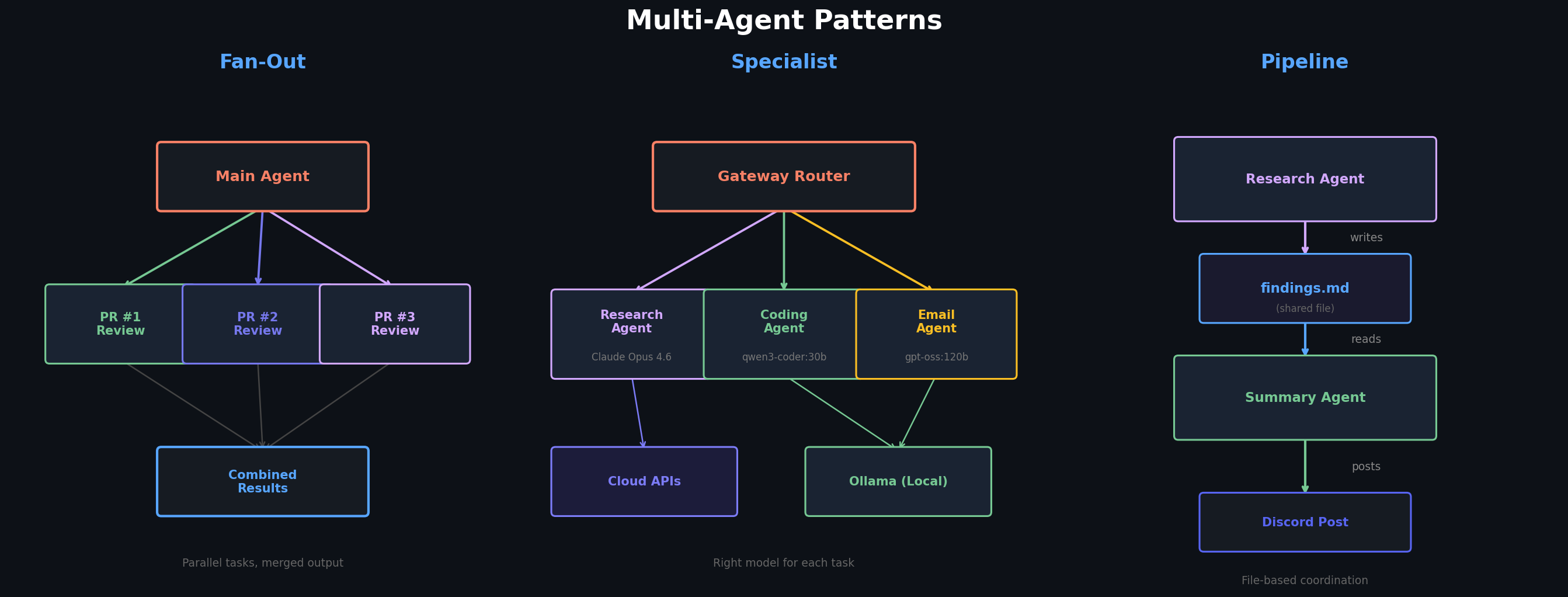
Fan-out pattern: The main agent spawns N sub-agents in parallel, each tackling a piece of a larger task. For code reviews, I can spin up one agent per file or per PR. They run simultaneously, each with its own context window, and report results back independently.
Specialist pattern: Different agents use different models. A coding sub-agent might use qwen3-coder:30b locally for fast iteration, while a research agent uses Claude Opus 4.6 for deeper reasoning. The gateway routes each agent to its configured model.
Pipeline pattern: Agent A does research, writes findings to a file, and agent B picks up that file to draft a summary. They do not communicate directly but coordinate through the file system and workspace. This is simple but effective for multi-step workflows.
The DGX Spark's 128GB of unified memory makes local multi-agent workloads practical. Running three agents simultaneously against gpt-oss:120b works because Ollama handles request queuing internally. The model stays loaded in memory and serves requests sequentially. For true parallelism across models, I run the coding model and the reasoning model side by side, each serving different agents.
The key insight is that agents are cheap to spawn and cheap to kill. There is no warm-up cost, no state to preserve between runs (unless you want to). A cron agent that runs every 30 minutes lives for maybe 15 seconds, does its job, and disappears. This is fundamentally different from running a single long-lived assistant. It is more like a team of specialists that show up when needed.
Balancing Local and Cloud Models
Not every task needs the same model. The DGX Spark runs two local models through Ollama: gpt-oss:120b for reasoning-heavy tasks and qwen3-coder:30b for code generation. Cloud models. Claude Opus 4.6, GPT-5.2 via Codex, and Claude Sonnet 4.5. Handle tasks that need broader knowledge or longer context windows.
The split is deliberate. Personal PII never leaves the machine. Email monitoring, inbox triage, calendar summaries, and anything touching personal data runs exclusively on local models through Ollama. The agent reads your emails, processes them locally, and posts a summary to Discord. No email content ever hits an external API.
Cloud models handle tasks where privacy is not a concern: web research, summarizing public articles, generating code, and drafting content based on public information. The OpenClaw gateway routes to the right model based on the cron job configuration. Each job specifies which model to use.
In practice, the split looks like this:
Local only (Ollama):
- Email monitoring and triage (reads full email bodies)
- Calendar event summaries (contains names, locations, meeting details)
- Follow-up drafting (references private conversations)
- Workspace backup (accesses local files)
- Any task that processes personal messages or contacts
Cloud models:
- Morning briefing news summaries (public headlines)
- Web research and trend analysis
- Code generation and review
- Documentation drafting from public specs
The 128GB unified memory on the DGX Spark makes this practical. Running a 120B parameter model locally would be impossible on most hardware, but on the Spark it runs comfortably with room for the 30B coding model simultaneously. The tradeoff is speed. Local inference on gpt-oss:120b is slower than a Claude API call. But for background cron jobs that run while you sleep, latency does not matter. Privacy does.
To configure this in OpenClaw, each cron job specifies its model explicitly:
# Local model for email (PII stays on-device)
openclaw cron add inbox-monitor --model ollama/gpt-oss:120b ...

# Cloud model for news research (no PII)
openclaw cron add morning-briefing --model anthropic/claude-sonnet-4-5 ...
If you are running on less powerful hardware, you can still apply this pattern with smaller local models. A 7B or 14B model can handle email classification and basic triage. The key principle is the same: keep personal data local, send only public-context tasks to the cloud.
Security: Run It Sandboxed
One thing I want to be explicit about: always run your agent in a sandboxed environment. An AI agent with shell access, email access, and the ability to push to GitHub is powerful. And that power needs guardrails.
OpenClaw supports sandboxed execution modes that limit what the agent can do. For cron jobs especially, use isolated sessions so a misbehaving job cannot affect your main conversation or other automations. Key recommendations:
- Use isolated sessions for cron jobs. Each job runs in its own sandbox with no access to other sessions.
- Set tool deny lists. If a cron job only needs email access, deny it shell execution and browser access.
- Audit regularly. OpenClaw logs every tool call. Review what your agents are doing, especially in the first few weeks.
- Never store secrets in the workspace. Use environment variables or a secret manager. My daily-backup job specifically scans for and redacts secrets before committing.
- Small models need more sandboxing. Smaller local models are more susceptible to prompt injection than frontier models. If you are running a 7B model as your cron agent, lock down its tool access aggressively.
The OpenClaw security guide covers this in detail. Take it seriously. Your agent has real access to real systems.
Privacy tip: If you are routing any traffic through cloud APIs, use a VPN like NordVPN to encrypt your connection and prevent your ISP from logging which AI services you use. Their Threat Protection also blocks trackers. Affiliate link: I may earn a commission if you buy through it, at no extra cost to you.
 Affiliate link: I may earn a commission if you buy through it, at no extra cost to you.
What It Costs
The local inference (Ollama) is free after the hardware investment. The DGX Spark is not cheap, but you do not need one. A Mac Studio M3 Ultra with 128GB runs the same models. A 64GB machine can run the 30B model comfortably. Even a 16GB machine can run smaller models like Qwen3.5-35B-A3B (only 3B active parameters).
Cloud API costs depend on usage. My setup uses Claude Opus 4.6 as the default for the main session and local models for most cron jobs. A typical month runs about $20-40 in API costs, with the majority of automation running entirely locally. The inbox-monitor alone would cost significantly more if it ran on a cloud API 34 times a day.
Electricity cost for running the DGX Spark 24/7 is roughly comparable to a gaming PC left on. Noticeable but not dramatic.
The Result
After a few weeks of tuning, this is what a typical day looks like:
- 7:00 AM: Inbox monitor starts its first scan. I am still asleep.
- 8:00 AM: Morning briefing and task coordinator post to Discord. By the time I check my phone, the day's priorities are laid out.
- 8:00 AM - 11:00 PM: Inbox monitor runs every 30 minutes. I get notified about important emails within 30 minutes of arrival without checking email manually.
- 10 AM / 2 PM / 6 PM / 10 PM: Notable email triage surfaces things worth knowing about.
- Monday 9 AM: Blog bot proposes topics. I pick one, it writes the post and opens a PR.
- 11:00 PM: System updates itself and backs up to GitHub.
- Throughout the day: I message the agent on Discord for ad-hoc questions, code reviews, research, and writing. It uses local models for fast responses and falls back to cloud APIs for complex tasks.
The system is not perfect. Cron jobs occasionally fail (model timeouts, API rate limits), the agent sometimes misinterprets email urgency, and prompt tuning is an ongoing process. But the core value proposition holds: the machine does work while I do not, and the work it does is useful.
If you have a machine with enough memory to run a decent local model and 30 minutes to set up OpenClaw, you can have something like this running by tonight. Start with Ollama and OpenClaw's getting started guide. The hardware ceiling is high, but the entry floor is a laptop with 16GB of RAM.